Creature merging
Moonjar
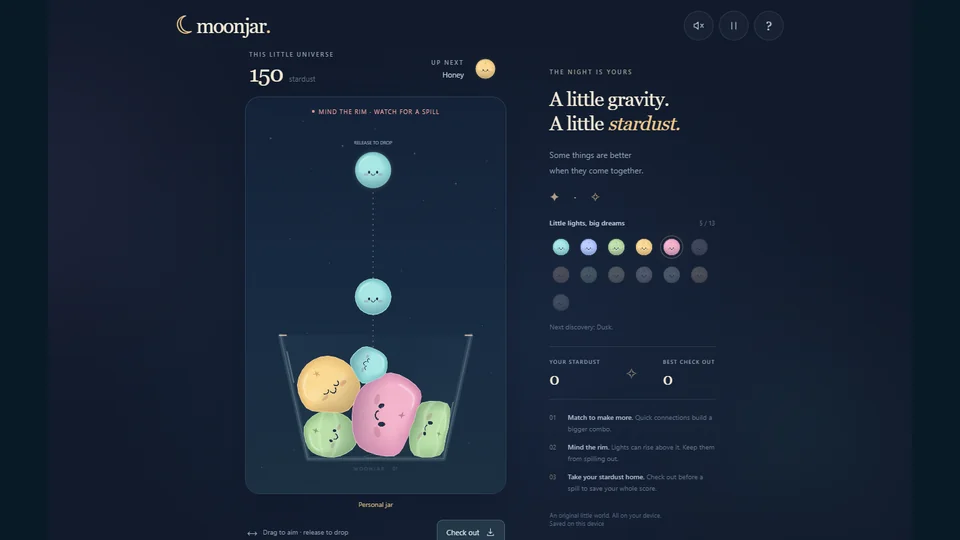
Drop tiny creatures into a jar, merge matching pairs, and bank your stardust before the jar spills.
Play MoonjarFree to play in your browser.
How to play
Aim above the jar and drop a creature. Matching creatures merge into the next creature in a sequence of 13. Keep making space as the jar fills, and choose when to check out before the jar spills.
- Matching pairs unlock the next creature; quick chains build a combo.
- Check out to settle a run and bank its stardust.
- Reaching Nova can expand the cup, up to four growth steps.
Scoring and progress
Merges add stardust and quick consecutive merges increase the combo. Check out to bank the current run. A spill banks nothing from that run, but does not remove stardust already banked in earlier runs. Growing the cup gives you more room, up to 130% of its starting size.
A good first run
- Keep matching creatures close enough to meet as they settle.
- Watch the space near the top, not just the next possible merge.
- Check out while you still have control of the jar if you want to protect the run’s stardust.
Your saves and devices
Guest progress and supported unfinished jars are saved in this browser. Export guest progress to keep a separate backup or transfer it to another browser or installed app. Optional accounts can sync completed jars, discoveries, personal achievements, and preferences; an unfinished jar stays on its original device. Signing in keeps guest progress separate until you review and attach it. Clearing browser data can remove local progress.
Moonjar supports mouse, touch, and keyboard controls, with installation in supported browsers. After the game confirms its complete offline package is ready, personal play can work offline. Online accounts, synchronization, and ranked play need a connection. Ranked Classic and Daily Jar require a signed-in account with a verified email. Keep a progress export when moving between a browser and an installed app.
Player questions
Should I check out or keep merging?
Continuing can earn more stardust, but a spill banks zero for the current run. Checking out banks what you have earned.
Does a spill erase my earlier bank?
No. It loses the current run’s unbanked stardust; previous banked stardust remains.
Can I keep a backup?
Use the game’s export tools and retain the backup file somewhere separate from browser storage.
Does signing in move my current jar to another device?
No. Completed personal progress can sync, but an unfinished jar stays on its original device. Guest progress is attached only after you review and confirm it.
Something different?