Fish survival
School Rush
Lead a growing school of fish, collect pearls, and dodge predators in Warm Waters and Dark Waters.
Play School RushFree to play in your browser.
How to play
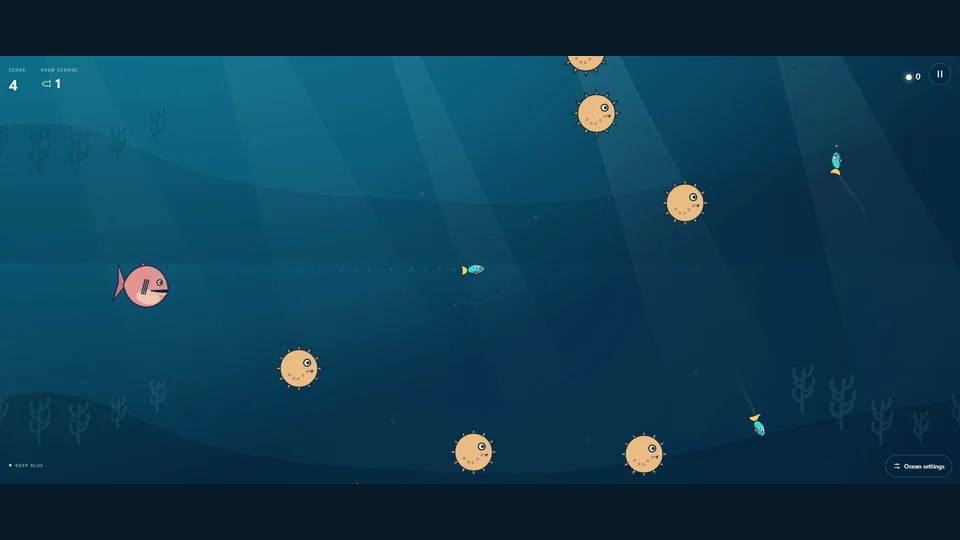
Guide your fish through moving ocean hazards and recruit the fish you meet. Each recruit grows your school. Keep at least one fish alive: the run ends when you lose your last fish.
- Choose the bright Warm Waters or the limited visibility of Dark Waters.
- Build a larger school while avoiding coral spikes, hunting fish, and sharks.
- Collect pearls and explore the fish collection through the account menu.
Scoring and progress
Recruiting adds points equal to your new school size, so keeping fish alive makes the next recruit more valuable. Each run shows your score and biggest school. Best scores are kept separately for the waters rulesets. Guest records stay on this device; signed-in play uses the existing account progress system. A local swim does not award account rewards.
A good first run
- Leave room to turn before coral reaches your school.
- Protect the fish you already have: a larger school improves recruitment scoring.
- In Dark Waters, use the edge of your light as a warning and keep your turns controlled.
Your saves and devices
Guest records belong to this browser and origin. Use your account for account progress, and let pending saves finish before moving devices. If you played at the old apps.cdtw.ca home, use its move and recovery tools before reinstalling from the new home.
The released game provides keyboard, pointer, and touch steering. Installation is available in supported browsers. Installation does not make account sign-in, synchronization, or rewards available offline.
Player questions
Does hitting an obstacle immediately end the run?
A run ends when the last fish is lost. Keep recruiting and protect your remaining school.
Where is my old installed game?
The old home still provides a move notice, guest transfer, backup-file import, and recovery access. Account progress remains in the production account system.
Something different?